Finally a task manager for visual thinkers! Your whole task list, sized and coloured, to give you the big picture!
BubbleBrain replaces the list with a canvas. Every task is a bubble whose size and colour show how urgent it really is — worked out for you from deadlines, priority, how long it's been sitting there, and how you've actually finished work in the past.
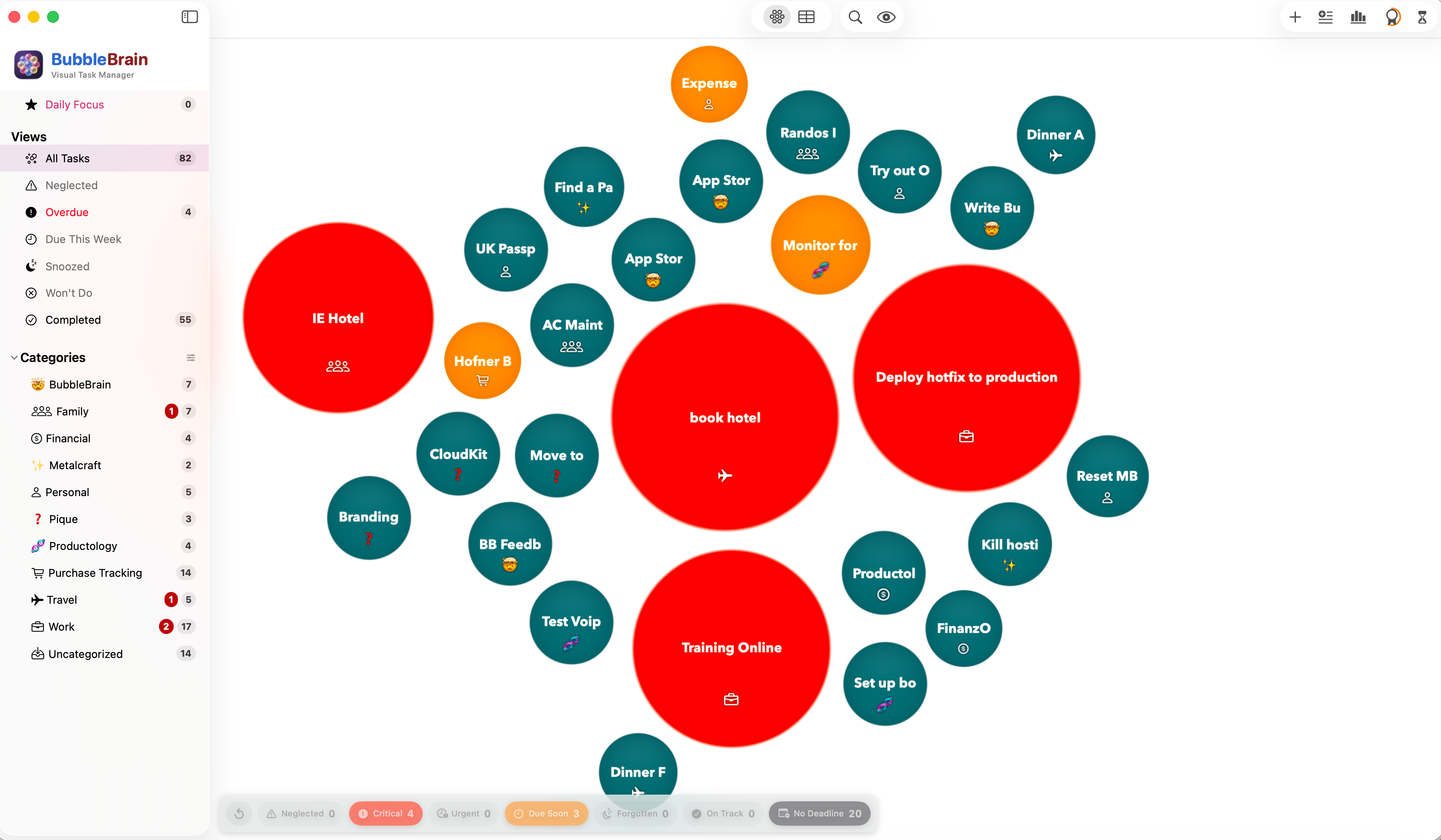
Big and red is overdue or at risk. Teal has no deadline and is ticking along. The filter bar counts every level.
It decides what's urgent, so you don't have to keep re-deciding.
Urgency isn't something you set in BubbleBrain. It's recalculated every time your data changes and on a five-minute timer in the background, so the canvas is always telling you the truth about where you stand.
Bubbles show you the priority
Every active task is a bubble. Size and colour carry the urgency, so a glance tells you whether today is calm or on fire. Drag bubbles into an arrangement that makes sense to you — positions are saved per view and per category.
Risk analysis, not just deadlines
Each task with a deadline gets a 0–100 risk score built from five components: your historical late rate in that category, workload pressure, time pressure, a priority adjustment, and task age. A high score promotes a task to Critical long before the deadline is close.
Time Warp
Scrub thirty days back or forward and watch bubbles resize and recolour to show how your workload will look. Deadline text, list columns and the focus queue all follow the simulated date. It's read-only — the slider never touches your real data.
Search that forgives you
Press ⌘F and type. Exact, fuzzy, phonetic and semantic matching all run at once — managment finds management, fantom finds phantom, roadmap finds sprint planning. Every calculation happens on-device through Apple's NaturalLanguage framework.
Daily Focus Queue
Pick up to seven tasks for the day and start each morning knowing exactly what you're working on. The queue rolls over on the real date only — scrubbing into next week in Time Warp never disturbs it.
Focus Mode
Hide anything past your horizon — 7, 14, 30 or 90 days — and the canvas quiets down to what's actually in reach. A badge keeps you honest about how much is hidden: "30-day horizon — 12 of 47 shown".
Canvas or list, smart views, categories
Switch to a sortable, multi-select list with ⌘L. Jump to Neglected, Overdue, Due This Week, Snoozed, Won't Do or Completed from the sidebar. Group work into categories with their own emoji, and break tasks down with subtasks, recurrence and snoozing.
Bulk import by text
Paste a list — meeting notes, a brain dump, a spreadsheet column — and BubbleBrain parses it into tasks, reading deadlines and priorities out of the wording as it goes. Review what it found before anything is committed, or bring a whole library across with File ▸ Import.
iCloud sync through CloudKit
Tasks, categories, focus queue entries and your saved bubble positions sync in the background across every Mac on the same iCloud account. Local backups run alongside it, and BubbleBrain restores from them — never silently — if macOS clears the synced copy.
Six urgency levels, plus grey for done
Tasks with deadlines and tasks without them are classified by completely separate rules, so a colour always means one thing.
A list tells you what exists. A canvas tells you where you stand.
You see shape, not scroll
A hundred rows of text all look the same. A hundred bubbles don't — one enormous red one in the corner is a different feeling from an even field of teal, and you get it before you've read a single title.
The prioritising is done for you
You can't set urgency by hand, which means you can't quietly lie to yourself about it. It comes from deadlines, priority, staleness, how much you have in flight, and how often work like this has run late for you before.
Native, and yours
A real macOS app, not a web page in a wrapper. Search runs entirely on your Mac. Sync runs through your own iCloud account, with local backups underneath it and a full export whenever you want one.

Stop reading your task list. Start seeing it.
BubbleBrain — Visual Task Manager for macOS.